How can I use the auto
Last Update date : Feb 03. 2026
इस लेख को हिंदी में देखने के लिए कृपया यहाँ क्लिक करें
The auto-clean function automatically cleans and dries the inside of the air conditioner indoor unit. In order to keep the air conditioner in optimum condition and maintain purity of the air in your home, regularly clean the indoor unit, filters, and external exchanger.
What is an auto-clean function?
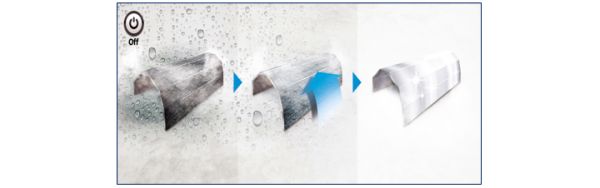
WindFree AC takes minimum effort to clean. It doesn’t need any disassembly and can be done through the remote or your smartphone. It freezes and de-freezes the heat exchanger to clean itself and uses the drain hose after the wash, saving you the trouble of throwing the water separately. Finally, it dries up any moisture.
During this whole process the indoor unit will display the progress from 1% to 99%. Please note: The consumers might hear a cracking sound (due to shrinking & expansion) that will end after the process.
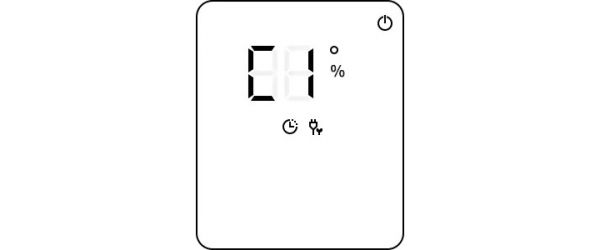
Displayed Cl code in the indoor unit
If Auto-Clean function is turned on, Cl will be displayed in the indoor unit.
When operation is off, auto-clean runs for 10 min. (in a few models for 15-30 min.)
The indoor unit display shows the cleaning progress (from 1 to 99%).
After auto clean, the air conditioner will turn off automatically.

How to activate the auto-clean function
When you set the auto-clean function, it will start immediately after the air conditioner is turned off. If you start a function while in auto-clean operation, the auto-clean function will reset, and will be restarted when that function has stopped or completed.
Step 1. Press and hold the Options button for 3 seconds or more.
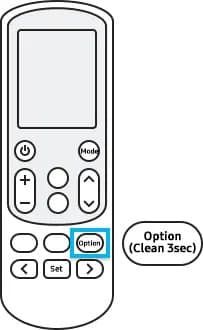
Step 2. Go to the directional buttons (right or left arrow) to select the Clean function on the remote control display.

Step 3. Click the Settings button to confirm.
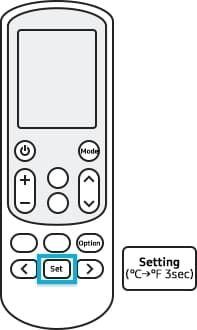
Note:
The actual design of the remote controller may differ from your model. This image is just a sample in English but is available in the language of your country.How to deactivate the auto-clean function
Method 1: Press and hold Options button for 3 seconds or more. Method 2: Press Options button and then go to the directional buttons (right or left arrow) to select the Clean function on the remote control display. Finally, click the Settings button to confirm.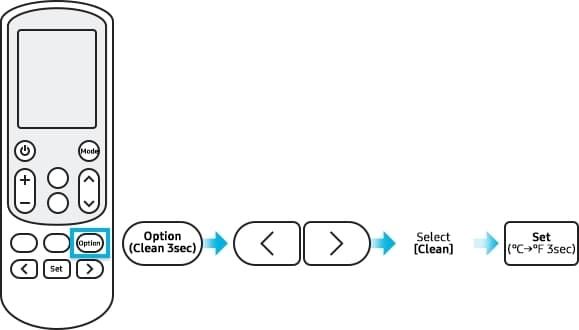
Note:
The actual design of the remote controller may differ from your model. This image is just a sample in English but is available in the language of your country.Cancelling auto-clean during the operation
To cancel auto clean while it is running, press the power button on the remote control twice within 20 seconds.
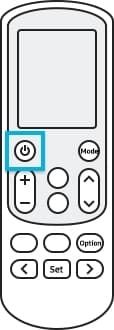
Note:
The actual design of the remote controller may differ from your model. This image is just a sample in English but is available in the language of your country.Watch Video:
Explore how-to video for your air conditioner on our offical Samsung India YouTube channel, click here.
Other topic you may interested in:
Thank you for your feedback!
Home Home Product Help & Support Product Help & Support Home Appliance Home Appliance How can I use the auto-clean function of my air conditioner How can I use the auto-clean function of my air conditioner相关知识
How Long Does The Battery Last On An IPod Nano 7th Generation?
How To Attain The Ultimate Body Wellness (11 Beautiful Habits)
What nutrition coaching is and how it can help you
How to check battery usage on your iPhone or iPad
Benefits of Turmeric and Curcumin (+ 12 Practical Ways to Use It!)
whats the battery life
How Health Coaches Can Support Clients on GLP
Unlocking Power of Physiotherapy: How It Can Transform Health
健康: The health in Mandarin flashcard.
Kumu Wellness Coaching
网址: How can I use the auto https://m.trfsz.com/newsview1910356.html